Token system and queue TV for clinics
ClinicLync gives every patient a token at reception and shows the queue on a TV in the waiting room. Doctors call the next token with one key (F9); the TV chimes, announces it and shows who is next. Patients stop crowding the doctor's door.
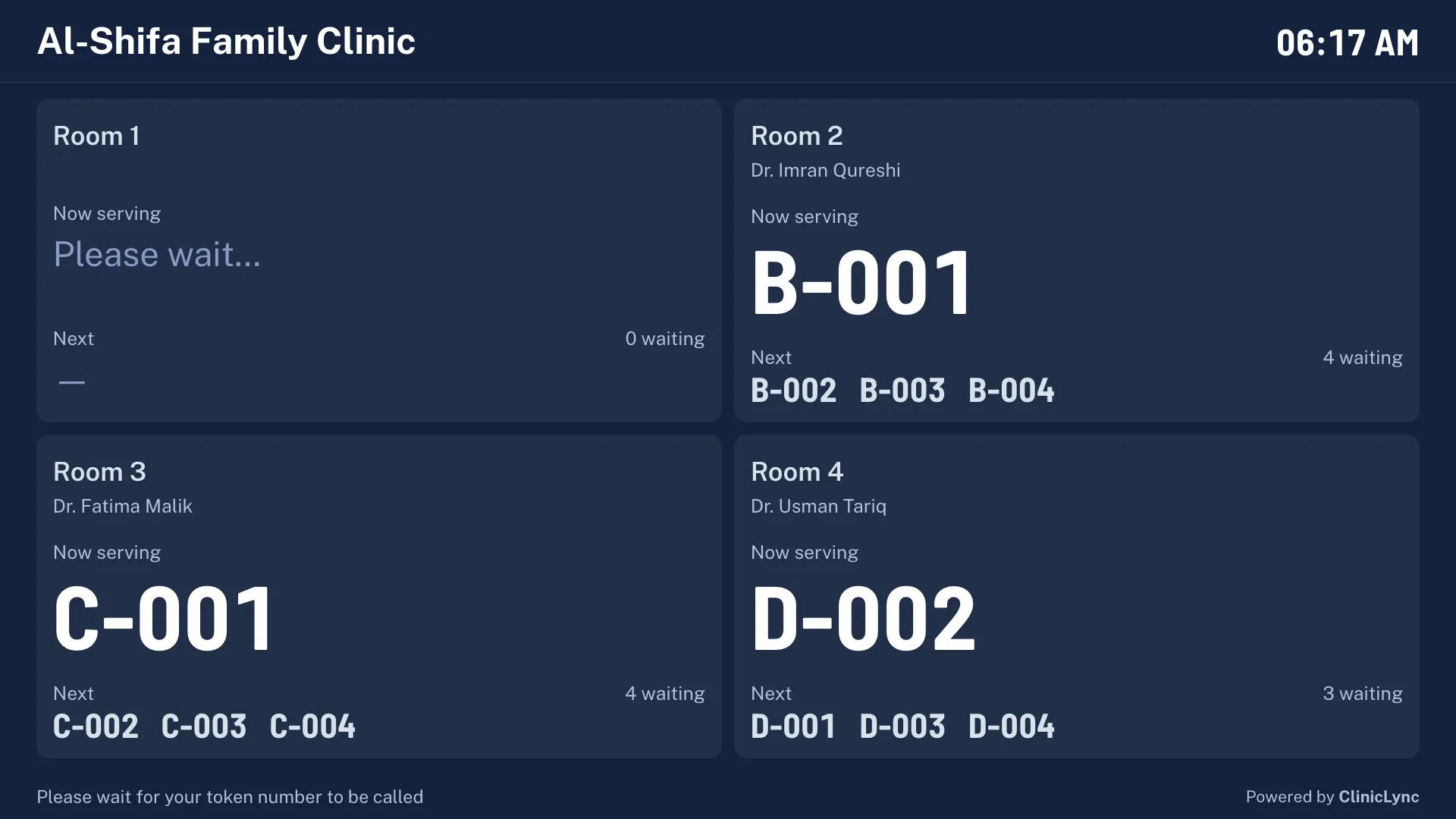
How tokens work
Each room has its own token series (A-001, B-001 …), restarting every day. Reception picks the doctor, presses Enter, and an 80 mm token slip prints. Priority (elderly, pregnant) and emergency tokens go ahead of the normal queue, with the reason recorded.
- Token per room or per doctor, numbered daily
- Priority and emergency tokens with a reason
- Hold, skip, did-not-come and back-to-queue
- Reprint a slip from the queue in one click
The waiting-room TV
Any TV with a browser, or a small PC connected to it, shows each room's doctor, the token being served, the next three and how many are waiting. A new call chimes, is spoken aloud, and the room lights up for a few seconds. It fits any number of rooms and any screen, from a 32-inch set to 4K, and starts by itself after a power cut. No patient names are ever shown.
Queue board for staff
Reception and nurses see every room on one board: who is with the doctor, who is waiting and for how long, and who has had vitals taken. It updates by itself.
- Live waiting times per patient
- Vitals done / waiting shown per token
- Works on a tablet for the nurse
Questions
Do we need a special TV for the token display?
No. Any smart TV with a browser, or any TV with a small PC or TV stick connected, works. You open the clinic's TV address once; after that it starts by itself.
Can the TV announce tokens in Urdu?
The TV always chimes and shows the token. It speaks the call in English, and in Urdu when the TV computer has an Urdu voice installed.
Does the token system work without internet?
Yes, with a ClinicLync clinic server: the TV, reception and doctors all work over the clinic's own network.
Everything else in ClinicLync
- Doctor and prescriptionsElectronic medical records for OPD doctors: vitals, notes that save as you type, ICD-10 diagnoses, prescriptions with allergy and duplicate warnings, Urdu instructions, follow-ups and visit history.
- Billing and khataBilling for clinics in Pakistan: consultation fees, price list, discounts with approval, cash, card, bank, JazzCash and Easypaisa with transaction IDs, patient khata, refunds, receipts and day close.
- PharmacyClinic pharmacy software: dispense from the doctor's prescription, stock by batch and expiry (first-expiry-first-out), low and out-of-stock alerts, walk-in and counter sales, and returns linked to the bill.
- LaboratoryClinic lab software: orders from doctors, sample taken, results with normal ranges by age and sex, automatic flags, verification, amendments with a reason and A4 lab reports with the clinic letterhead.
- Cloud, offline or hybridRun ClinicLync in the cloud, on your own clinic server that works with no internet, or hybrid: a clinic server with a read-only cloud copy. Built for load-shedding and unreliable internet in Pakistan.
- Patient data securityHow ClinicLync protects patient records: role-based access, audit log of every look, encrypted CNIC and phone, database-level separation between clinics, two-step login and encrypted nightly backups.